13 Integrated Glass Manufacturing & Fabrication Software Modules
Glass processing software, one database everything your glass business needs, all working together.
One system from quote to delivery. Tap a module to explore.
- New
 Infinity2X GlassOne
ONE LOGIN
✦ AI BUILT IN
- Live 17 Nov
- Live 24 Nov
Core
The foundation every other module sits on.
- Set up your company, branches, users and settings once
- Every module shares one login and one database
- Built-in Infinity2X Assistant: ask about customers, orders and deliveries in everyday language
- Switch on more modules later without moving any data
Accounts Receivable
Get invoices out and payments in.
- Create the invoice from the sales order in one step
- Receipt customer payments as they arrive
- Always-current view of what each customer owes
- Connect to Xero, MYOB, Reckon One or Sage 200 Evolution if you use them
Accounts Payable
Stay on top of what you owe suppliers.
- Enter supplier invoices and record payments
- Raise purchase orders for stock glass, aluminium and hardware
- Send any sales order line to a supplier as a purchase order
- A clear picture of upcoming payments for cash flow
Debtors
Chase overdue accounts before they hurt.
- Set credit limits for each customer account
- Aged balances by customer in one view
- Spot slow payers early and follow them up
CRM
From first contact to confirmed order, plus a free app.
- Log prospects, calls, meetings and site visits
- Create a quote directly from a prospect
- Turn an accepted quote into a sales order
- Infinity2X CRM app for iOS and Android at no extra cost
Glaziers
Bookings for measures, installs and repairs.
- Calendar with one column per glazier; drag a job to move it
- Measure sheets that convert into a glass quote
- Measure, quote, order, production and install all in one job
- Book an emergency repair into the next free hour
- Customer signs off on site; print or email the sheet
- Infinity2X Glazier app for the team on site (coming soon)
Asset Maintenance
Less downtime for machines and vehicles.
- One register for cutting tables, edgers, CNCs, furnaces, forklifts and trucks
- Scheduled preventive maintenance
- Work orders to fix breakdowns before they halt production
- Inspections on the Infinity2X CMMS mobile app
Inventory
Sales, purchasing and production all see the same stock.
- Live quantities, costs and stock movements
- Track full sheets, offcuts, aluminium sections and hardware
- Stock across several factories, branches and sites (Enterprise)
- Infinity2X Inventory scanner app for GRVs, transfers, stock takes and glass status
Price Matrix
Consistent prices on every quote.
- All product prices kept in one matrix
- Trade accounts can have their own special prices
- Applied automatically to quotes and orders
- Edgework, holes and other processing priced as well
Production
Follow every panel from cutting to dispatch.
- Plan cutting and processing runs
- Barcode label printed for each panel
- Scan panels through cutting, edging, toughening and dispatch
- Infinity2X ProdScan app on the factory floor
- Production users are free up to your plan's limit
Delivery Management
Know what is on each truck and where it is going.
- Plan delivery runs and customer pickups
- Allocate trucks and drivers
- Print a run sheet per truck
- Scan pieces onto the correct truck and confirm each drop-off
OHS
Safety records kept together, not in folders.
- Log incidents as they happen
- Maintain a hazard register
- Record toolbox talks
- Handling glass is high-risk: have every safety record ready when you need it
- Part of the Enterprise plan
Document Management
Files live with the job, customer or asset they belong to.
- Store drawings, measure sheets and photos against the job
- Keep compliance certificates and signed delivery dockets
- Open any file from its order, customer or supplier
- Included storage: 100 GB Starter, 200 GB Small, 300 GB Enterprise
- Buy extra storage whenever you need it
SheetSmart
Glass cutting optimisation that cuts waste. Live from 17 November 2026.
- Nests pieces on sheets using guillotine cuts, per glass type, and shows the yield %
- Know how many sheets of each type and thickness you need before ordering or cutting
- Uses glass packs already on your racks first and flags any shortfall
- Combines pieces from different jobs with the same glass onto shared sheets
- Sends a single optimised batch to the cutter, so there is one plan to follow
- Works out the true glass cost of each job from the yield
FlowSim
Simulate your factory to see dates, workload and bottlenecks. Live from 24 November 2026.
- Realistic finish dates for each job, based on the stations it actually passes through
- Test a rush order first: see which jobs move back and which stations fill up
- Daily load per station highlights busy days and idle time
- Flow board shows where panels are waiting; Live mode refreshes with each scan
- Full-screen live board for a factory TV, showing every station and panel
- Compare scenarios before you add a shift, buy a machine or outsource work
- Outsourced processing such as toughening is included in lead times, and the job is released once it is marked received
Security
Included in every plan at no extra cost.
- Users must verify their email before signing in
- One-time SMS code to verify phone numbers
- Two-factor sign-in with Microsoft Authenticator or Google Authenticator
- Permissions control what each user can see and do
- Automatic backups so data can be restored
- Cloud hosting in Melbourne, Sydney, Los Angeles, Dallas and New Jersey, or install on-premise
Infinity2X CRM app
Your sales pipeline on your phone, free on iOS and Android.
- Site visits and follow-ups due today
- Search customers and prospects in seconds
- Check in at visits and log calls, meetings and notes
- Open prospects and pipeline value at a glance
- No charge for any user on any plan
Infinity2X ProdScan
Factory-floor scanning app for Android, free to download.
- Scan glass labels at each station: cutting, edging, toughening, dispatch
- Office and shopfront see production status live
- Designed for production users, free up to your plan's limit
- Works on rugged ScanSKU barcode scanners
Infinity2X Inventory
Stock scanning that saves straight into GlassOne. Free Android app.
- Scan incoming glass and process GRVs for supplier deliveries
- Move stock between warehouses
- Run stock takes
- Check glass stock status
Infinity2X Glazier app
The site toolkit for glaziers on iOS and Android (coming soon).
- Day's bookings: measures, installs and urgent repairs
- Record measurements opening by opening
- Quote, order and invoice from the measurements
- Email or print documents on site
- Photos and customer sign-off
- Profit for each job
- SMS the customer when a booking is made, moved or cancelled
- Create a supplier purchase order from the sales order
Infinity2X CMMS app
Asset maintenance on your phone, iOS and Android.
- Dashboard per branch: open, due, overdue and failed inspections
- See assets out of service or waiting for repair
- Do inspections, check assets and work orders on site
- Syncs with Infinity2X CMMS in the cloud, so the office sees the same data
- Works on rugged ScanSKU scanners (Android)
- Light and dark mode
How a glass order moves through Infinity2X GlassOne
Six steps, one system. Press play or tap a step to see which modules do the work along the way.
-
Order received
Orders come in over the counter, by phone or as an emailed PDF. For PDFs, AI order entry fills in the sales order for you.
CRMSales OrdersAI Order EntryGlaziers -
Priced and stock checked
Your standard prices and the customer's agreed rates are applied from the price matrix, and GlassOne confirms the glass is in stock.
Price MatrixInventory -
Cutting planned
SheetSmart fits the pieces onto as few sheets as possible, starting with stock on your racks, and sends one cutting plan to the floor. FlowSim works out when the job will be finished.
SheetSmart · soonFlowSim · soonProduction -
In production
Each panel is labelled and scanned with ProdScan at every station, so the front counter can tell customers exactly where their glass is.
ProductionProdScan appInventory -
Out the door
Trucks are loaded against the run sheet and each drop-off is confirmed, or the customer collects from the counter.
Delivery ManagementProdScan app -
Invoiced and paid
The invoice comes straight from the order, payments are receipted, and late payers are chased from Debtors.
Accounts ReceivableDebtors
Less glass waste and delivery dates you can stand behind
Two new Infinity2X tools for glass processors: SheetSmart works out the best way to cut, and FlowSim tells you when each job will be done.
Infinity2X SheetSmart
Glass cutting optimisation- Without itLayouts are worked out by hand, which leaves big offcuts and a lot of waste.With itPieces are nested on each sheet with guillotine cuts, glass type by glass type, and you see the yield % for every plan.
- Without itWorking out how many sheets a batch of orders needs is guesswork.With itYou get the exact sheet count for each glass type and thickness before ordering or cutting.
- Without itNew sheets get ordered even when the right glass is already in the rack.With itGlass packs you already hold are used first, and any shortfall is shown so you only buy what is missing.
- Without itEach cutter picks their own sequence and layout from a stack of orders.With itOne optimised batch is released to the cutting table, so everyone works from the same plan.
- Without itA few pieces of the same glass on separate jobs each use up a whole sheet.With itPieces from different jobs with the same glass are combined onto shared sheets.
- Without itYou can't tell which jobs are costly to cut and which are not.With itYield turns into an actual glass cost for each job, not an estimate.
Infinity2X FlowSim
Production scheduling simulation- Without itFinish dates are a best guess and customers are often let down.With itEach job gets a forecast finish date based on the stations it really goes through, so the dates you give hold up.
- Without itThere is no way to know whether a rush job will squeeze in.With itAdd it to the simulation and see which jobs move back and which stations get overloaded.
- Without itSome stations are swamped while others sit idle.With itA day-by-day load chart for each station shows the peaks and the quiet spots.
- Without itYou only find the bottleneck once work has piled up.With itThe flow board flags the station where panels are queuing, and Live mode refreshes with every scan.
- Without itSomeone has to walk the floor to find out where a job is.With itA live board, also in full screen for a factory TV, shows each station and panel as scans come in.
- Without itAdding a shift, buying a machine or outsourcing is a hard call to make.With itRun the forecast and station load with and without the change and compare the results.
- Without itGlass sent out for toughening holds up jobs without anyone noticing.With itJobs waiting on outsourced purchase orders are counted in lead times, and are released as soon as the glass is marked received.
1. SheetSmart sets up the cutOne optimised plan goes to the cutting table.
2. ProdScan tracks each panelEach scan moves panels to the next station and refreshes the board.
3. FlowSim checks the dateThe live board compares where every job is with its forecast.
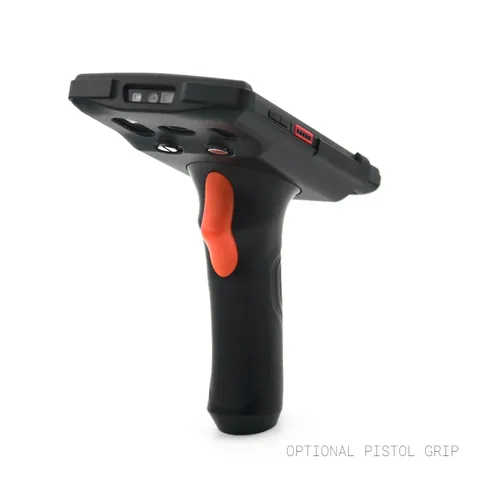
Glass Label Scanning on Tough Handheld Scanners
Factory floors are hard on phones and tablets, so we work with ScanSKU, who supply rugged barcode scanners in Australia. You get the hardware, our scanning apps and Infinity2X GlassOne, ready to use together from the start.
- Receive glass deliveries and process supplier GRVs on arrival
- Transfers between warehouses
- Stock takes
- Check the status of glass stock
- Runs Android 13 and reads 1D and 2D barcodes; IP66 rated and survives 1.5 m drops
- Battery lasts up to 12 hours of scanning, with repairs done in Melbourne




Company
Manage company profiles, branches, and settings from a single control centre.
Accounts Receivable
Track customer invoices, payments, and outstanding balances in real time.
Accounts Payable
Manage supplier invoices, purchase payments, and cash flow with ease.
Debtors Manager
Monitor customer accounts, credit limits, and follow up on overdue balances.
Sales Orders
Create quotes and sales orders, and convert them to production and invoices.
Purchase Orders
Order raw glass, aluminium, and hardware directly from your suppliers.
Inventory
Track stock levels, costs, and movements across warehouses and job sites.
Production
Glass processing software that schedules and tracks cutting, fabrication, and assembly through to dispatch.
Delivery Management
Plan delivery runs, assign drivers, and track jobs from dispatch to site.
Contacts
A single CRM for customers, suppliers, and site contacts across your business.
Price Matrix
Set product pricing and customer special pricing in one price matrix, so every quote picks up the right price for each trade account automatically.
Label Printing
Print glass panel labels with dimensions, job numbers, and barcodes straight from sales orders and production.
Glaziers: From the First Call to the Signed-Off Install
Book site measures, installs and emergency repairs for your glaziers, and run every job in one place: the measure, the quotes and orders, production and the install. The Infinity2X Glazier App for glaziers on site is coming soon.
Booking Calendar
A column per glazier. Drag to reschedule, with a warning before anyone is double-booked.
Site Measure to Quote
The measure sheet from site becomes a glass quote, one line per opening.
One Job, Every Step
Measure, quotes, orders, production and install all sit on one job.
Emergency Repairs
Urgent repair bookings for the next hour, shown in red on the calendar.
Infinity2X CRM Module + Free Mobile App
Glass is still sold face to face: site measures, showroom visits, builder meetings and quote follow-ups. The Infinity2X CRM module gives your sales team a pipeline of prospects, a daily visit schedule, one-tap call, email and directions, and an activity log for every customer. The mobile app for iOS and Android is free for every user.
Explore Infinity2X CRM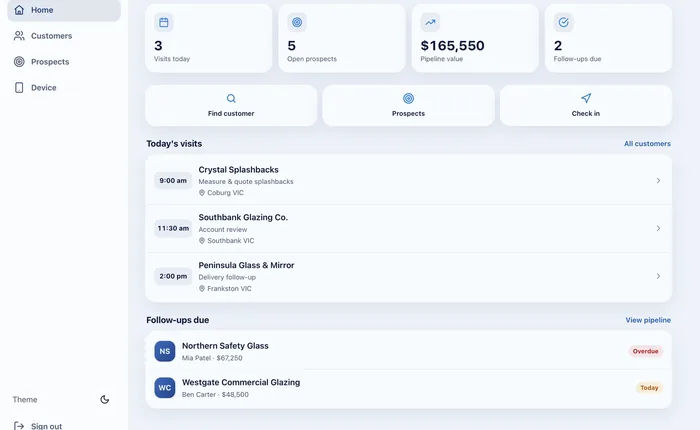
Enterprise Modules for Multi-Site Glass Processors
Once you run toughening furnaces, CNC machines and more than one site, you need more than orders and invoices. Enterprise adds the modules that protect your margins, your machines and your people.
Job Costing
Compare quoted against actual glass, labour, processing and freight on every job, so you can see which jobs and customers really make money.
Multi-Warehouse
Track stock sheets, offcuts, aluminium sections and hardware across factories, branches and job sites.
Assets
A register of cutting tables, edgers, CNC centres, toughening furnaces, forklifts and delivery trucks.
Asset Maintenance
Schedule preventive maintenance and work orders for production machinery, so breakdowns don't stop the factory.
OHS Management
Record safety incidents, hazards and toolbox talks. Glass handling is high-risk work, so keep the records in one place.
No Double Entry Into Your Accounting System
Already use an accounting package? Infinity2X GlassOne connects to Xero, MYOB, Reckon One and Sage 200 Evolution through connectors built and maintained by CNet Software Solutions. Invoices and supplier bills raised in Infinity2X GlassOne flow through to your accounts, so your bookkeeper stops re-keying glass jobs and month-end reconciles faster.
Accounting integration is available on every plan: Starter, Small and Enterprise.
Xero
MYOB
Reckon One
Sage 200 Evolution
Every Module Talks to Every Other Module
No double entry, no disconnected spreadsheets. A quote flows straight through to a sales order, production job, delivery, and invoice all in one system.
Modules, Answered
Do I have to use all 13 modules?
No. Turn on only the modules your business needs now, such as Sales Orders and Inventory, and add the rest later as you grow.
Can I add modules later without losing data?
Yes. Every module shares the same underlying database, so switching one on later doesn't require re-entering anything you've already set up.
Do the modules work together automatically?
Yes. A sales order automatically feeds Production, Delivery Management, and Accounts Receivable, so there's no manual re-entry between modules.
Is the CRM module an extra cost?
No. The Infinity2X CRM module is included in Starter, Small and Enterprise plans, and the mobile CRM app for iOS and Android is free for every user.
Which modules are Enterprise only?
Multi-Warehouse, Job Costing, Assets and Asset Maintenance, OHS Management and on-site support are part of the Enterprise plan. Document Management is on every plan, with 100 GB (Starter), 200 GB (Small) or 300 GB (Enterprise) of storage included.
Which accounting systems does Infinity2X GlassOne connect to?
Infinity2X GlassOne connects to Xero, MYOB, Reckon One and Sage 200 Evolution using connectors developed by CNet Software Solutions, so invoices don't have to be entered twice.
Can I use the modules on a tablet on the factory floor?
Yes. Every module runs in a web browser, so production and dispatch staff can use it on a tablet or phone, while the office works on desktop.
See Every Module in Action
Request a personalised demo and our team will walk you through the platform with your own business data.